AI Voice Changer Sound Effects
- 4.7
- Rating
- 5.00M
- Installs
- Free
- Price
 Analysis by App-foxy
I tested AI Voice Changer Sound Effects as a small, playful audio tool rather than a full recording studio. Its main appeal is immediate: record your voice, apply an effect, and listen to the result without needing music-production experience. That makes it easy to imagine using it for a joke between friends, a short social clip, a character voice, or a quick experiment with sound.
The app sits in the Music & Audio category and comes from GeniusTools Labs. It is free to start, suitable for Everyone, and its current release is version 3.0.3. The store presents it as an AI voice changer, but I found it more useful to judge it by what it does in practice: it is a lightweight voice-effects playground, not a replacement for a serious editor or a professional voice-processing setup.
How the app feels to use in everyday situations
I find the app easiest to judge through the small moments it suits: trying a character voice before sending a joke, or checking whether a transformed greeting still sounds clear. In this section, I’ll focus on the practical choices that make those short sessions more comfortable and useful, including how I’d keep a playful recording from becoming a frustrating one. That everyday perspective also helps show where its novelty can—and cannot—turn into a habit.
You May Also Like

 Blood Strike: 2.5 Anniversary
Blood Strike’s Loadouts Turn Every Drop Into a Tactical Gamble
A close look at Blood Strike’s custom loadouts: how fast access to signature weapons reshapes its battle royale rhythm, rewards preparation, and narrows the gap between fights.

 Pandora - Music & Podcasts
Pandora’s Music Is Easy to Start, but Harder to Recover
Pandora’s strength is its low-effort path from a seed to a station. Its weak spot is how much confidence it asks you to place in connection, setup, and quiet recovery.

 8 Ball Pool
 Is Built on Rivalries, Rematches, and Routine
A close look at the rivalries, rematches, shared routines, and unanswered safety questions that turn a quick pool match into a persistent mobile community.

 Samsung Music
’s Quiet Strength Is Playing What You Already Own
Its reach comes less from spectacle than from dependable access to a personal library. That simplicity is both the app’s strongest retention engine and its ceiling.

 AccuWeather: Weather Radar
AccuWeather Review: A Quick, Clear Forecast for Everyday Decisions
For everyday plans, the best forecast is the one you can understand quickly. AccuWeather makes rain timing, radar, and local conditions easy to act on, with a few trade-offs.

 Hill Climb Racing
Why Hill Climb Racing Still Turns Crashes Into One More Run
A tiny car, a bumpy hill and one more upgrade: Hill Climb Racing keeps resurfacing because its simple chaos makes every near-miss feel personal.
More From Our News Desk



Readable controls and a low-learning-curve layout
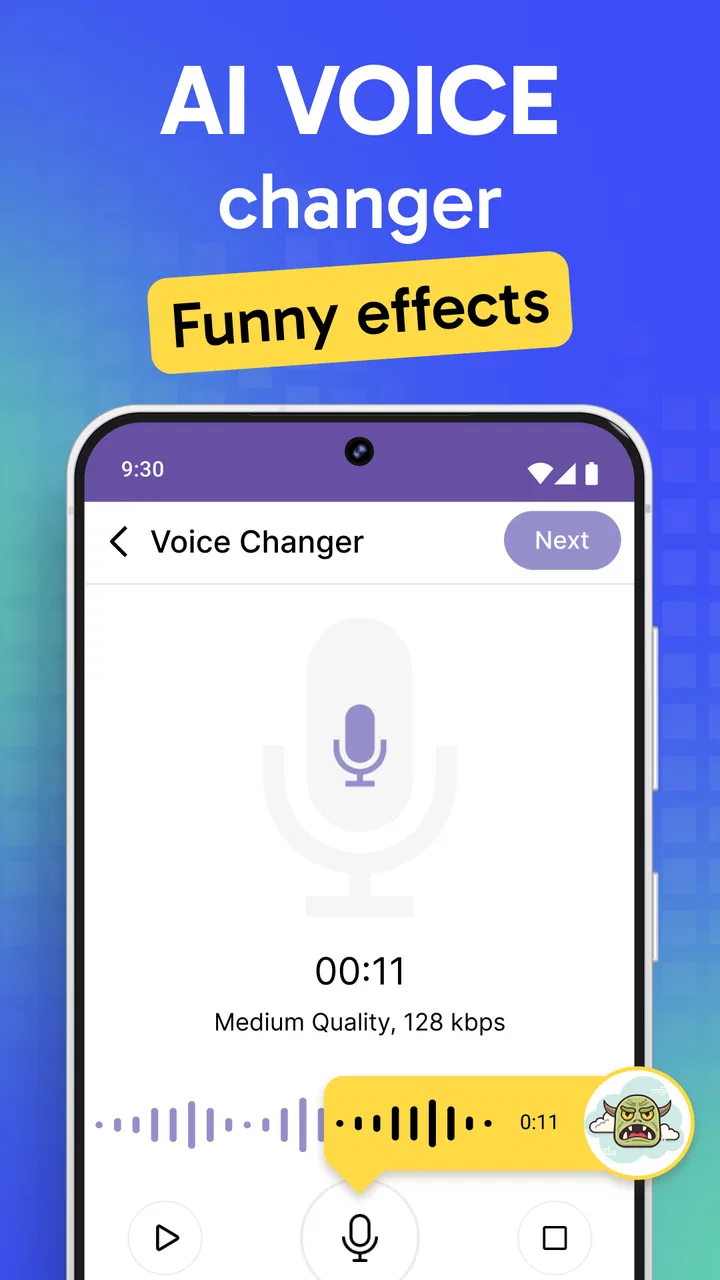
My first impression was that the basic workflow is understandable even if you have never edited audio. The central idea is simple enough to follow: make a recording, choose an effect, and play it back. That matters for people who find complex timelines, layered tracks, or technical audio terminology tiring. You do not need to understand equalization, compression, or pitch correction before trying the main function.
The visual presentation is best suited to short sessions. I would not open it expecting the detailed organization of a desktop workstation. Instead, it works like a quick-access utility where the fun comes from testing several voices and deciding which one fits the moment. For a first-time user, that limited scope can be an advantage because there are fewer concepts to learn at once.
There is also a practical benefit for users who prefer to explore by listening rather than reading long instructions. A short recording can reveal the character of an effect faster than a technical explanation. I recommend recording a neutral sentence first, such as a greeting, and reusing it while comparing effects. That creates a fairer test than speaking a different sentence for every option.
On the other hand, people who rely heavily on large text, strong contrast, or highly explicit labels should inspect the interface on their own device before committing to regular use. A simple workflow does not automatically mean every control will be equally comfortable for every reader. My experience suggests that the app is approachable, but its real accessibility depends partly on screen size, display settings, and how clearly each effect is presented on a particular phone.
What the voice effects are good at
The strongest use case is quick transformation. I could imagine recording a message for a group chat, creating a funny reply, or trying a character voice before deciding whether it belongs in a longer project. The app lowers the effort between having an idea and hearing a rough result. That immediacy is more valuable than deep editing when the goal is a moment of entertainment.
A useful workflow is to keep the spoken line short and leave a little silence before and after it. This makes it easier to judge whether the effect changes the voice cleanly or makes the words difficult to understand. It also helps when you are comparing several treatments, because a long recording can hide small differences behind changing volume, breath, and background noise.
I would not treat every effect as equally suitable for communication. A dramatic transformation may be amusing in a private joke but unpleasant or confusing in a spoken instruction. If the listener needs to understand every word, I would choose the least aggressive result and replay it through the same headphones or speaker that the recipient is likely to use.
Motor considerations during recording and playback
For users with limited dexterity, the short sequence of actions is potentially friendlier than an editor that requires dragging clips, trimming tiny edges, and adjusting several sliders. Tapping to begin a recording and selecting a sound effect can be less demanding than precise timeline work. This is one of the app’s practical strengths, especially when the user wants a result rather than a polished production process.
Still, voice recording creates its own timing challenge. If starting and stopping quickly is difficult, the first attempt may include unwanted silence or a cut-off word. My advice is to pause briefly after activating recording, speak at a steady pace, and leave another moment before stopping. That small habit reduces the need for repeated takes and makes the experience less frustrating.
People who cannot comfortably hold a phone near their mouth may find the app more useful with the device placed on a stable surface. That arrangement also improves consistency between recordings. I would avoid moving the phone while speaking, because handling noise can become more noticeable once an effect has been added.
Sensory comfort and listening choices
Voice effects can be intense. Some altered voices emphasize sharp, metallic, deep, or unusual tones, and repeated playback may be tiring for people sensitive to sudden changes in pitch or volume. I recommend beginning at a low listening level and previewing one effect at a time. The entertaining result is not worth discomfort.
Headphones can make differences between effects easier to hear, but they can also make harsh processing feel more direct. A phone speaker is useful for checking how understandable the result remains in an ordinary setting. For a child or anyone sensitive to loud audio, I would supervise the first session and avoid leaving a transformed recording playing repeatedly.
The Everyone content rating makes the app broadly approachable from an age perspective, but that does not mean every sound is comfortable for every listener. The rating describes general content suitability, not individual sensory tolerance. I see this as a reason to use the preview stage thoughtfully rather than assuming every effect will feel harmless or pleasant.
Using it when the environment is not ideal
A realistic scenario is a family gathering where someone wants to make a funny voice message without setting up a microphone. The app can fit that moment because the task is short and the result is immediate. I would step away from the loudest part of the room, place the phone on a table, and record close enough for speech to remain clear without touching the microphone.
In a busy environment, background noise becomes a major limitation. A voice effect cannot reliably turn a noisy recording into a clean one. If you are on public transport, in a crowded café, or near a television, the transformed voice may be harder to understand than the original. For that reason, I would use the app for spontaneous ideas in noisy places but record the final version somewhere quieter.
It can also be useful for people who communicate through short audio messages and want a playful change of tone. However, I would not use an altered voice for urgent information, directions, medical details, or anything where recognition and clarity matter. Friends may enjoy guessing who is speaking, but that same uncertainty is a weakness when the listener needs confidence about the speaker’s identity.
Where it stands beside ordinary alternatives
Compared with recording a normal voice memo, this app adds a clear entertainment layer with very little setup. A standard recorder remains better for clean, trustworthy speech, especially when the message needs to sound natural. If the goal is simply to preserve a conversation or dictate an idea, the extra processing is unnecessary.
Compared with a full audio editor, AI Voice Changer Sound Effects is easier to approach but much less suitable for detailed production. A traditional editor is the better choice when you need careful cuts, multiple tracks, precise volume control, background music, or repeatable settings. I would choose this app for a quick character experiment and a more advanced tool for a podcast, audiobook, or polished video soundtrack.
It also differs from live voice-changing tools. A recording-based workflow gives me a chance to listen before sharing, which is helpful when intelligibility matters. Live processing can feel more immediate during a call or game, but it may offer less opportunity to catch an awkward result before another person hears it. The right choice depends on whether spontaneity or review is more important.
Small workflows that make the results better
One of my favorite practical approaches is to create three versions of the same short line: a normal take, a mildly changed take, and a more dramatic take. Listening in that order makes the trade-off obvious. The strongest effect is not always the funniest; often the best result is the one that preserves enough of the original rhythm for the listener to follow the joke.
Another useful habit is to speak slightly more slowly than usual. Heavy processing can blur quick consonants, especially at the beginning and end of words. Slowing down gives the effect more room to work and helps the transformed recording remain understandable. This is particularly useful for users who want to send audio to someone who may already have difficulty distinguishing speech in noisy surroundings.
I would also keep the purpose of each recording in mind before choosing an effect. For a private joke, a strange or exaggerated voice may be perfect. For a character sample, consistency matters more, so I would reuse similar wording and speaking speed every time. For an accessibility-related communication need, I would prioritize clarity over novelty and compare the result on both headphones and a phone speaker.
Remaining barriers and practical trade-offs
The biggest barrier is that changing a voice does not solve the harder parts of audio communication. It cannot guarantee clear speech in a noisy room, and an effect may reduce intelligibility for listeners with hearing differences. If someone depends on captions, transcripts, or carefully articulated speech, the transformed recording may create extra work rather than remove it.
There is also a social consideration. A disguised voice can be funny among people who understand the context, but it can cause confusion when sent without explanation. I would label the message clearly or follow it with an ordinary voice note if the recipient might not recognize the joke. That is especially important in family, school, or work conversations where clarity is more valuable than surprise.
The free entry point makes experimenting easy, while optional in-app purchases range from ninety-nine cents to ninety-nine dollars and ninety-nine cents per item. I would explore the basic experience first and avoid assuming that every effect or extra option is necessary. The wide purchase range means it is worth checking what an item does before spending money, particularly if the app is being used casually.
Performance expectations should also remain realistic. Short clips are the natural fit for this kind of tool. If you want to process long recordings, organize a library of takes, or maintain exact audio quality from beginning to end, the streamlined design may feel restrictive. I would use it as a front-end idea generator, then move to a dedicated editor when a project becomes more serious.
Who should try it, and who should skip it
I think it is a good match for people who enjoy playful audio, want a simple way to make character voices, or need a quick effect without learning a complicated editor. It also suits users who prefer short, repeatable actions over detailed controls. The app’s broad age rating and free starting point make it easy to test in a family setting, provided an adult helps younger users make sensible choices about sharing recordings.
I would be more cautious if your priority is natural speech, professional sound, or precise accessibility support. A clean recorder is better for important messages, while a full editor is better for planned media work. Users who are especially sensitive to altered voices should preview effects carefully, and anyone relying on speech clarity should test the final result with the intended listener rather than judging it alone.
The app has attracted a 4.7 average from around 22 thousand ratings and has passed 5 million installs, which suggests that its straightforward entertainment purpose appeals to many people. Those figures do not change my main conclusion: popularity is less important than matching the tool to the job. Its strengths are speed, approachability, and playful experimentation, not professional control.
My inclusive verdict
After using AI Voice Changer Sound Effects, I see it as a friendly first step into voice processing. GeniusTools Labs has kept the central idea easy to grasp, and that simplicity can support users who would rather avoid dense audio interfaces. The app is most successful when I treat it as a short-session tool for creating and checking funny voice clips.
Its inclusive value comes from reducing technical effort, but it should not be mistaken for a complete solution for every ability or environment. Clear speech, comfortable listening levels, quiet recording conditions, and careful sharing still depend on the user. I would begin with a short neutral recording, compare a gentle effect with a stronger one, and ask the intended listener whether the result is understandable.
My recommendation is to try it when the goal is playful voice transformation, not dependable audio production. It is free to explore, works best with brief recordings, and can be genuinely enjoyable when used with awareness of sensory comfort and communication context. If you want a quick laugh or a character experiment, it earns a place on the phone. If you need precision, natural speech, or robust support for demanding listening situations, I would choose a conventional recorder or a more capable audio editor instead.
For a free Music & Audio app released on December 21, 2023, the current version gives newcomers a straightforward way to test the concept without a large learning curve. I would keep expectations modest, protect the privacy of anyone whose voice is recorded, and judge every effect by one question: does it make the message more enjoyable without making it harder to understand?
FAQs for AI Voice Changer Sound Effects
01What is AI Voice Changer Sound Effects, and what can it do?
AI Voice Changer Sound Effects is an audio-editing app designed to transform your voice with artificial intelligence and a collection of entertaining sound effects. You can record your voice, import an existing audio file, and apply different character, robotic, deep, high-pitched, or humorous effects. It is mainly intended for entertainment, creative content, messaging, and sharing short voice clips.
02How do I use AI Voice Changer Sound Effects to change my voice?
After opening the app, choose the recording option or select an audio file from your device, then browse the available voice filters and sound effects. Tap an effect to preview the result and adjust it if the app provides additional controls. Once satisfied, save the edited recording or use the sharing option to send it through compatible messaging and social media applications.
03Is AI Voice Changer Sound Effects free to download and use?
The application may be available to download at no initial cost, but some voice filters, sound packs, advanced tools, or export options can be restricted to premium users. Advertising may also appear during regular use. Before subscribing or making an in-app purchase, review the pricing, renewal conditions, and trial terms shown in the app store or inside the application.
04Does AI Voice Changer Sound Effects work offline?
Basic recording and some previously downloaded effects may work without an internet connection, depending on the version installed and the device platform. However, AI-powered processing, new sound packs, advertisements, account features, or sharing services may require internet access. If offline use is important, test the desired effects before traveling or relying on the app without mobile data.
05Is it safe and appropriate to use the edited voices for calls, videos, or social media?
The app is generally intended for harmless entertainment, creative projects, and personal audio experiments. However, users should avoid impersonating real people, misleading others, harassing anyone, or creating deceptive recordings. Check the permissions requested by the app, especially microphone and storage access, and review its privacy policy before recording sensitive conversations. Always follow local laws and platform rules when sharing generated audio.
Pros
- Offers many voice effects for calls
- videos
- and social content.
- Simple controls make it easy to create altered audio quickly.
- Useful for jokes
- gaming clips
- and creative voice recordings.
- Effects can add variety to otherwise ordinary recordings.
- Works well for short
- casual experiments with different voices.
Cons
- Some effects may sound artificial or repetitive after extended use.
- Advanced features may require a subscription or in-app purchases.
- Audio quality can depend heavily on your phone’s microphone.
- Real-time voice changing may introduce delay on some devices.
- Privacy permissions should be reviewed before recording or sharing audio.

AI Voice Changer Sound Effects
Gallery